


A certificate can be renewed successfully and still cause an outage. The replacement may not reach the system serving your website, or a customer portal or API may carry on using the old certificate. As certificate lifetimes shrink, businesses have less time to catch and fix mistakes like these.
In our earlier article on the 47 day certificate rule, we explained what was coming. The first change has now taken effect. Since 15 March 2026, newly issued publicly trusted TLS certificates, the certificates browsers use to establish secure website connections, have been limited to 200 days. That maximum falls to 100 days in March 2027 and 47 days in March 2029.
For business leaders, the question is no longer “When will the rule change?” It is “Can we replace every certificate reliably without disrupting customers?”
What has changed?
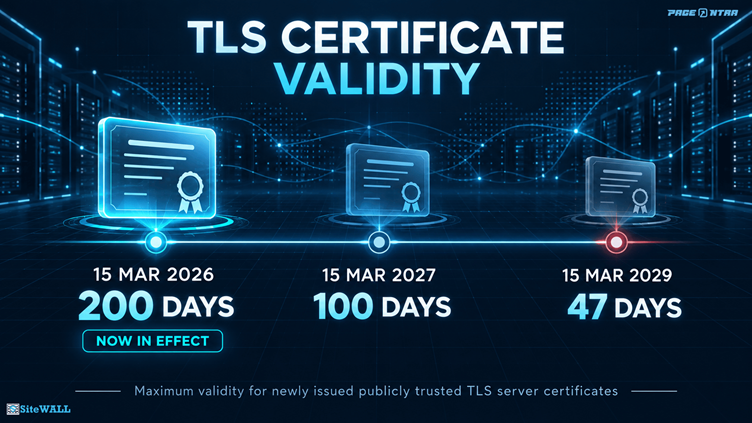
These are maximum lifetimes, not fixed renewal dates. Certificate authorities may issue certificates that last for less time. Certificates issued before a new milestone do not automatically expire when that milestone arrives.
The rules also shorten how long a certificate authority may reuse an earlier check that an organisation controls a domain. By March 2029, a certificate authority may reuse a domain control check for no more than 10 days. Organisations should therefore automate domain validation so they can obtain new certificates reliably whenever a fresh check is needed.
Why act before 2029?
Some certificate providers are already moving faster than the industry maximum. Let’s Encrypt made 45 day certificates available through an optional profile in May 2026. It plans to shorten certificates issued through its default profile to 64 days in February 2027 and 45 days in February 2028.
An annual calendar reminder cannot keep up with this pace. Existing automation also needs testing. A job programmed to attempt renewal every 60 days, for example, will be too late for a certificate that lasts only 45 days.
The lesson is simple. Check how long your certificates actually last, then test your renewal process against that lifetime.
A renewed certificate is not always a deployed certificate
Renewal is only part of the job. The replacement certificate has to reach the system that presents it to visitors, perhaps a CDN, load balancer, WAF, or web server. That system must then begin using it for every relevant website and API hostname.
Picture an online service with a main website, a customer login portal, and an API. The IT team renews the website certificate and sees a success message. But the customer portal carries on presenting its old certificate. The renewal worked, and a customer facing service was still missed.
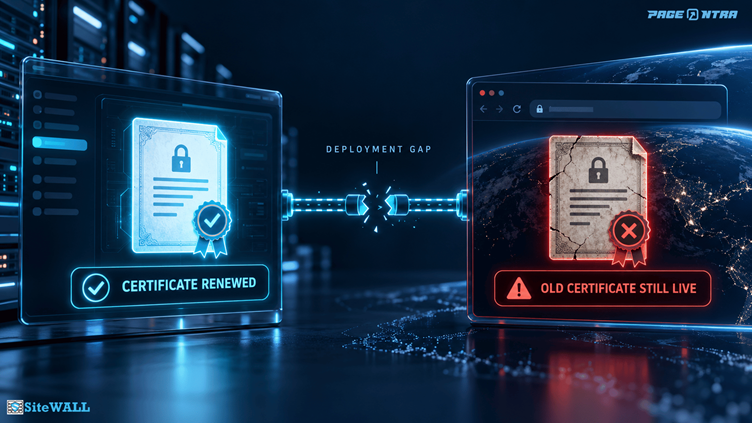
After renewal, verify the certificate presented by each public hostname from outside your network, including any CDN or load balancer routes. A successful renewal message on its own cannot confirm what every visitor actually receives.
Three questions every business leader should ask
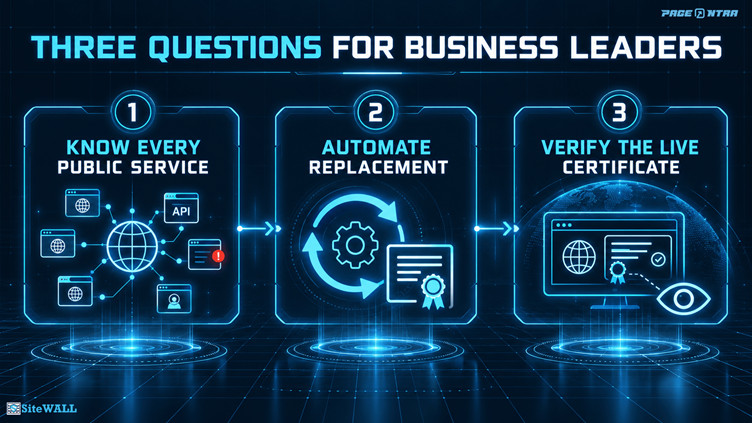
1. Do we know where all our public certificates are used?
Keep an inventory of websites, APIs, portals, and other internet facing services. For each one, record its certificate, expiry date, owner, renewal method, and the system where it is deployed.
Include services run by vendors. An outsourced portal can still affect your customers and your reputation.
2. Can certificates be replaced without relying on a calendar reminder?
Automate renewal and deployment wherever you can. Give the process an owner, and test what happens when it fails. A failed domain check or deployment should raise an alert early enough for someone to act.
3. Are we checking what customers see?
Monitor the certificate served by every public hostname. After renewal, confirm that the live service presents the replacement certificate across the routes customers use. An internal message saying the renewal succeeded is helpful, but it does not prove that deployment succeeded.
A practical plan before March 2027
Start with visibility. List your internet facing services and find the certificates that are renewed by hand or have no clear owner.
Test one complete renewal. Follow a certificate from issuance through deployment, then check what visitors receive at the public endpoint.
Expand and monitor. Apply the tested process across websites and APIs. Set expiry and failure alerts with enough time to investigate and recover. Review vendor managed services with their owners.
One useful measure for leadership is the percentage of public services with a named owner, automated renewal, and a verified live certificate. It shows whether the process works from beginning to end.
Where SiteWALL fits
For applications protected by SiteWALL, work out which system presents the certificate to the visitor. When SiteWALL plays that role, the certificate deployed there is the one the visitor sees, and updating a certificate on the application server alone will not change it.
Include protected hostnames in the inventory and verify their live certificates after renewal. If a load balancer sits in front of SiteWALL, check that layer too. The right process depends on the path each customer’s traffic takes.
The executive takeaway
Shorter certificate lifetimes reduce the time that outdated certificate information stays valid, and they support faster changes to security infrastructure. They also expose weaknesses in certificate operations sooner.
Know every public service. Automate certificate replacement. Check what customers actually receive. Organisations that build those three habits during the 200 day era will be better prepared for the 100 day and 47 day milestones that follow.
Reviewing certificate operations for applications protected by SiteWALL? Talk to the SiteWALL team.
Sources